No items found.
Skip to main content

Flight Planning Enhancements in 10.2

This release also includes a number of noteworthy improvements to flight planning and filing workflows.

No images available to display.
back
next

Continuing our drive to make flight planning in ForeFlight more powerful and efficient, this release also includes a number of noteworthy improvements to flight planning and filing workflows:

  • You can now enter multiple comma separated email addresses into the Email field at the bottom of the filing form to send flight plan information and updates from ATC, like expected route notifications, to fellow pilots or crew members.
  • ForeFlight now sends SMS text messages in addition to emails and push notifications to provide updates regarding your flight plan, such as ATC rejections and flight delay notices, slot allocation messages, and overdue VFR flight plan reminders.
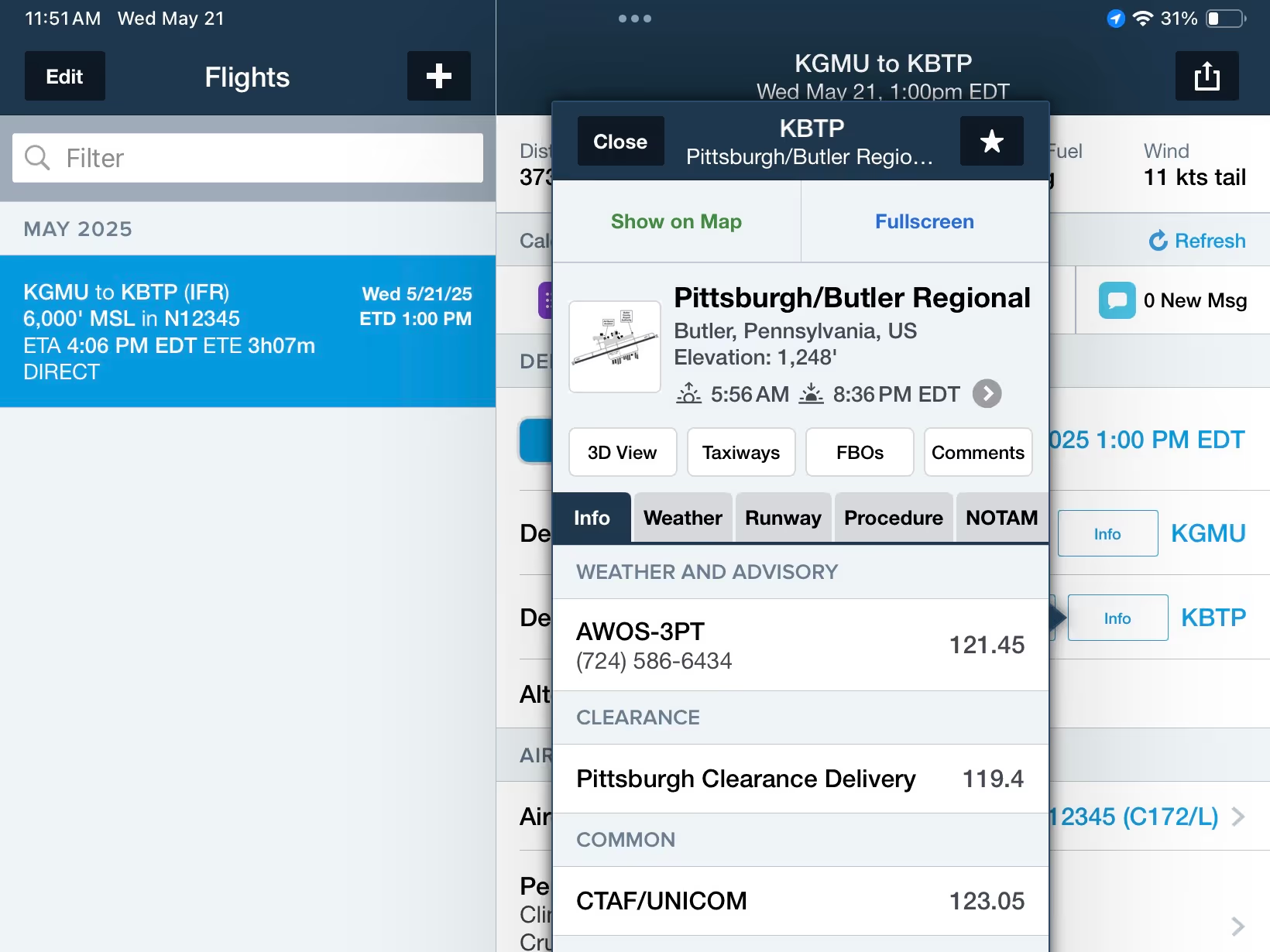
  • Use the new INFO button on Flights to view detailed information about your departure, destination, and alternate airports.
  • Tap-hold on the FILED and EXPECTED route strings in the flight plan filing form to copy them to your device’s clipboard and share them with others.

Release notes

Release notes

  • Continuing our drive to make flight planning in ForeFlight more powerful and efficient, this release includes a number of noteworthy improvements to flight planning and filing workflows.
  • ForeFlight now sends SMS text messages in addition to emails and push notifications to provide updates regarding your flight plan, such as EUROCONTROL slot allocation messages, flight suspension and de-suspension notices, and calculated takeoff time (CTOT) messages caused by delays to your planned flight.
  • The detailed and printable Navlog on Flights now provides spaces to record actual time and fuel values for each leg of your flight.
  • You can now enter multiple comma separated email addresses into the Email field at the bottom of the filing form to send flight plan information and updates from ATC like expected route notifications to fellow pilots or crew members.
  • Use the new INFO button on Flights to view detailed information about your departure, destination, and alternate airports.
  • Tap-hold on the FILED and EXPECTED route strings in the flight plan filing form to copy them to your device’s clipboard and share them with others.

Support

Support

FAQs
Finden Sie Antworten auf Ihre Fragen
Leitfaden anzeigen
Das vollständige ForeFlight-Handbuch
Videothek
ForeFlight-Videos – alle an einem Ort
Kaufberatung
Wählen Sie den richtigen Tarif