No items found.
Skip to main content

Internet Radar Coverage Limits

Easily differentiate between areas without internet radar coverage and areas with clear skies.

No images available to display.
back
next

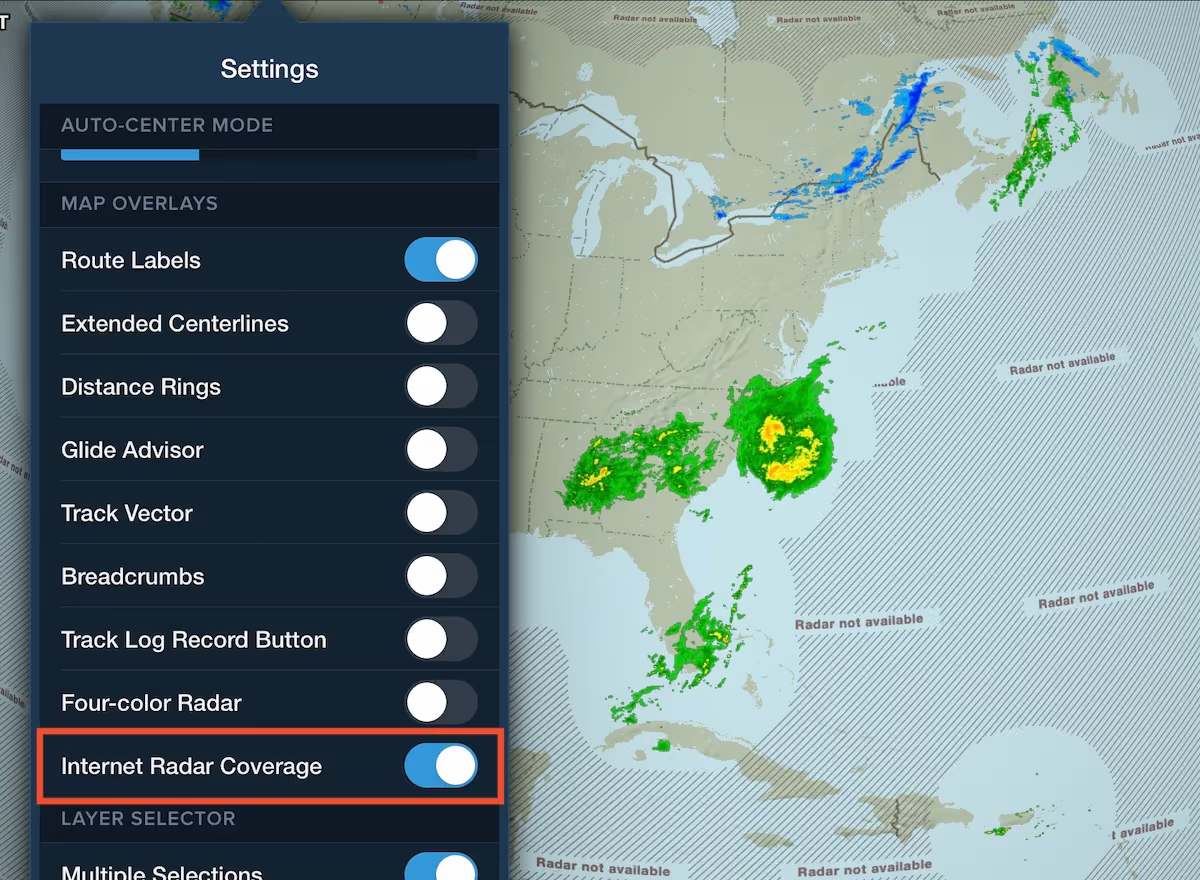
ForeFlight’s internet radar map layers (Composite and Lowest Tilt) now visually indicate on the map where coverage is not available to help you differentiate between areas without coverage and areas with clear skies. 

Non-covered areas display gray cross-hatching with a “Radar not available” message, allowing you to easily see the coverage boundaries. 

You can disable the coverage display and remove the cross-hatching by turning off the “Internet Radar Coverage” setting at the bottom of the Map Settings menu (the cog button on the Maps view). 

Release notes

Release notes

  • ForeFlight’s internet radar map layers (Composite and Lowest Tilt) now visually indicate on the map where coverage is not available to help you differentiate between areas without coverage and areas with clear skies.
  • Non-covered areas display gray cross hatching with a “Radar not available” message, allowing you to easily see the coverage boundaries. 
  • You can disable the coverage display and remove the cross hatching by turning off the “Internet Radar Coverage” setting at the bottom of the Map Settings menu.

Support

Support

FAQs
Finden Sie Antworten auf Ihre Fragen
Leitfaden anzeigen
Das vollständige ForeFlight-Handbuch
Videothek
ForeFlight-Videos – alle an einem Ort
Kaufberatung
Wählen Sie den richtigen Tarif