No items found.
Skip to main content
September 2025

Future Graphical NOTAMs Setting

Display Graphical NOTAMS on the Map up to 48 hours before they take effect.

No images available to display.
back
next

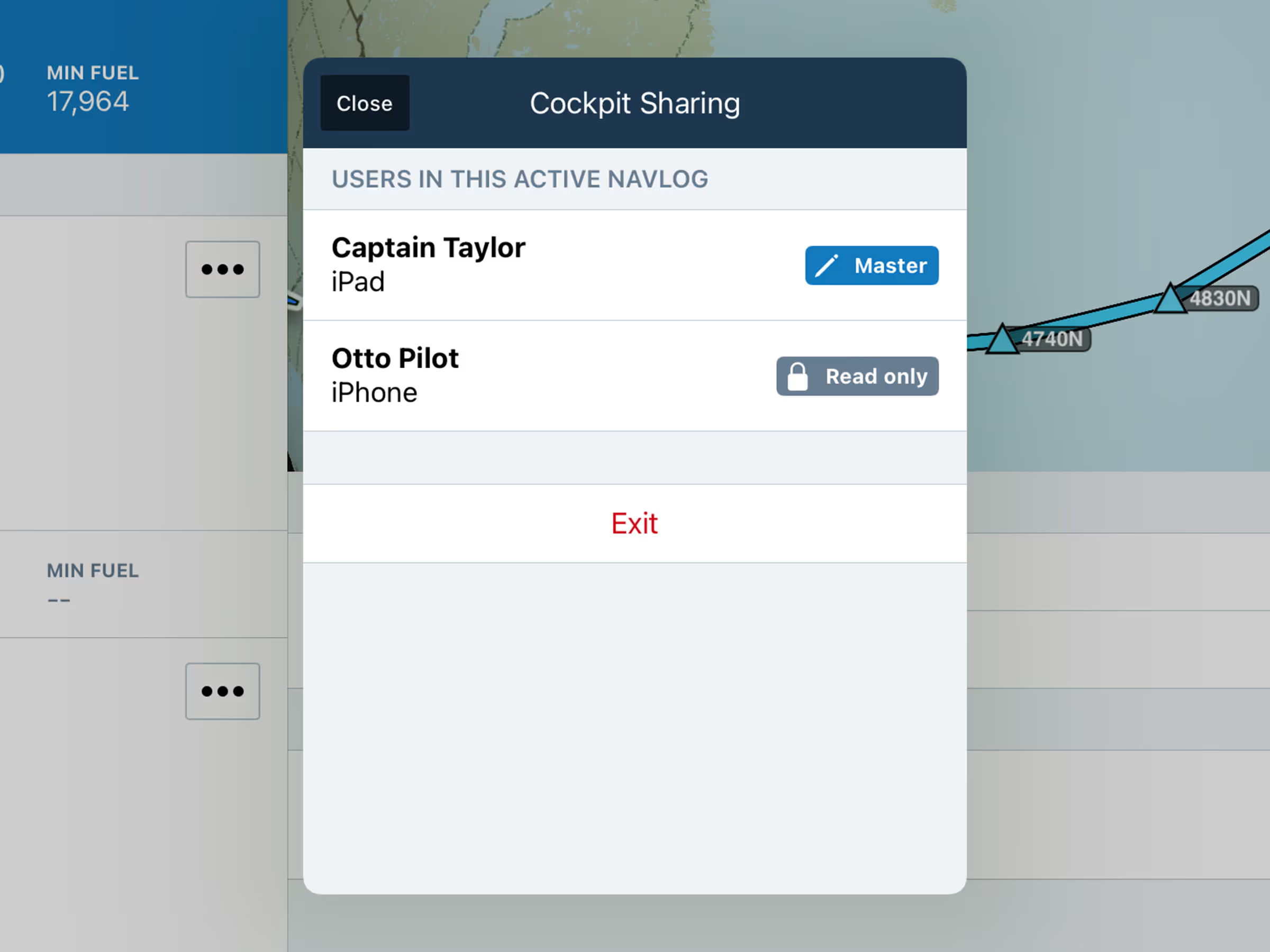
Plan ahead with the option to display Graphical NOTAMs on the Map up to 48 hours before their effective time. With the NOTAMs map layer enabled, go to Map Settings > NOTAMs Settings, then adjust the Show NOTAMs Within setting, and set it to any number of hours between 2 hours (the default setting) and 48 hours.
Release notes

Release notes

  • Plan for upcoming NOTAMs further in advance with a new option to reveal Graphical NOTAMs on the Map up to 48 hours before their effective time. 
  • With the NOTAMs map layer enabled, open Map Settings > NOTAMs Settings to find the “Show NOTAMs Within” setting, which you can set to any number of hours between 2 hours (the default setting) and 48 hours.

Support

Support

FAQs
Find answers to your questions
Pilot's Guide
The complete ForeFlight handbook
Video Library
ForeFlight videos all in one place
Buying Guide
Choose the right iPad and plan