No items found.
Skip to main content
June 2026

Map Annotations 2.0

Draw, edit, and format custom shapes directly on the Map view.

No images available to display.
back
next

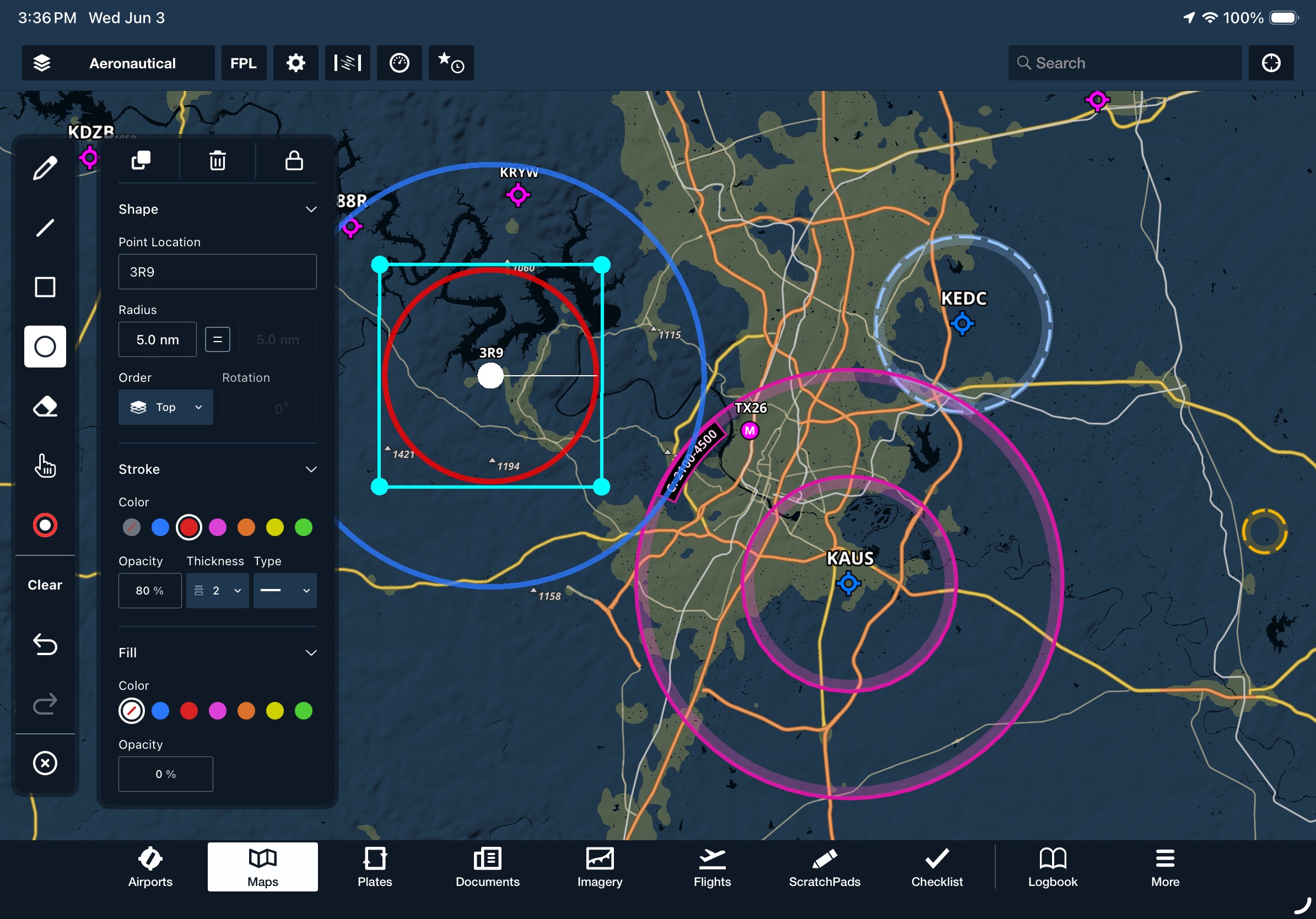
Draw and edit individual shapes directly on the Map view. Enable the Map Annotations overlay in the Map Settings menu, then tap the pencil icon on the left side of the screen to open the Map Annotations toolbar. The upgraded toolbar includes dedicated modes for lines, squares, circles, freehand drawings, and an eraser, along with color-picking, undo, and redo options. Tap any annotation to reposition it or open a detailed editor window, allowing you to center the annotation on specific coordinates or waypoints, adjust its size with locked or unlocked proportions, rotate it, change its stacking order, or modify its stroke and fill colors. The editor also allows you to duplicate, delete, or lock annotations from further editing.
Release notes

Release notes

  • Draw and edit individual shapes directly on ForeFlight’s map with a set of major enhancements to the Map Annotations feature.
  • After enabling the Map Annotations overlay in the Map Settings menu, tap the Map Annotations button on the left side of the screen to open the Map Annotations toolbar.
  • The upgraded toolbar includes several selectable modes to create and edit annotations: pencil, line, square, circle, eraser, and selection tool. It also includes a color-picker and clear, undo, and redo options.
  • After drawing an annotation using any of the modes, tap the new annotation to move it on the map and open an editor window allowing you to center the annotation on any coordinate or named waypoint, adjust its size (with either locked or unlocked proportions), rotate the annotation, change its order within a stack of multiple overlapping annotations, and change its stroke and fill color.
  • You can also duplicate, delete, or lock annotations from further editing using the row of buttons along the top of the editor window.
  • Map Annotations 2.0 is available with all ForeFlight subscription plan levels on both iPad and iPhone.

Support

Support

FAQs
Find answers to your questions
Pilot's Guide
The complete ForeFlight handbook
Video Library
ForeFlight videos all in one place
Buying Guide
Choose the right iPad and plan